Forum Replies Created
-
Please go to Visual Composer > Role Manager > Elements section.
You will see the Control user access to content elements.
You should leave it AllBest regards!
This reply has been marked as private.This reply has been marked as private.in reply to: HTTP ERROR 500 HELP! ASAP!!!This reply has been marked as private.in reply to: HTTP ERROR 500 HELP! ASAP!!!This reply has been marked as private.in reply to: HTTP ERROR 500 HELP! ASAP!!!This reply has been marked as private.in reply to: HTTP ERROR 500 HELP! ASAP!!!Hi,
Thanks for contacting us,
Please provide us your URL to login and the URL of the screenshot you sent.Have a nice day!
in reply to: HTTP ERROR 500 HELP! ASAP!!!Hi,
Thanks for contacting us,
We have just updated to the latest version of Visual Composer 5.2.1 but we don’t see the issue like you. Please try to clear server’s cache, browser’s cache, if the issue is still, could you please provide us an administrator account (via private reply) so we can go to check and help you.Have a great day!
Hi,
Thanks for contacting us,
What’s the version of The Events Calendar: Community Events plugin that installed on your site?And could you please provide us an administrator account on your site (via private reply) so we can check and help you.
p/s: And Can I public your site as a Customer’s Sites Showcases on themforest like that:
Customer’s Sites Showcases:
https://www.livevenuetix.com/Thanks and best regards!
Hi,
Here I attached the datasample, Please download it then flow these steps below:
– step 1: import the data sample, it contains the custom template like our demo.
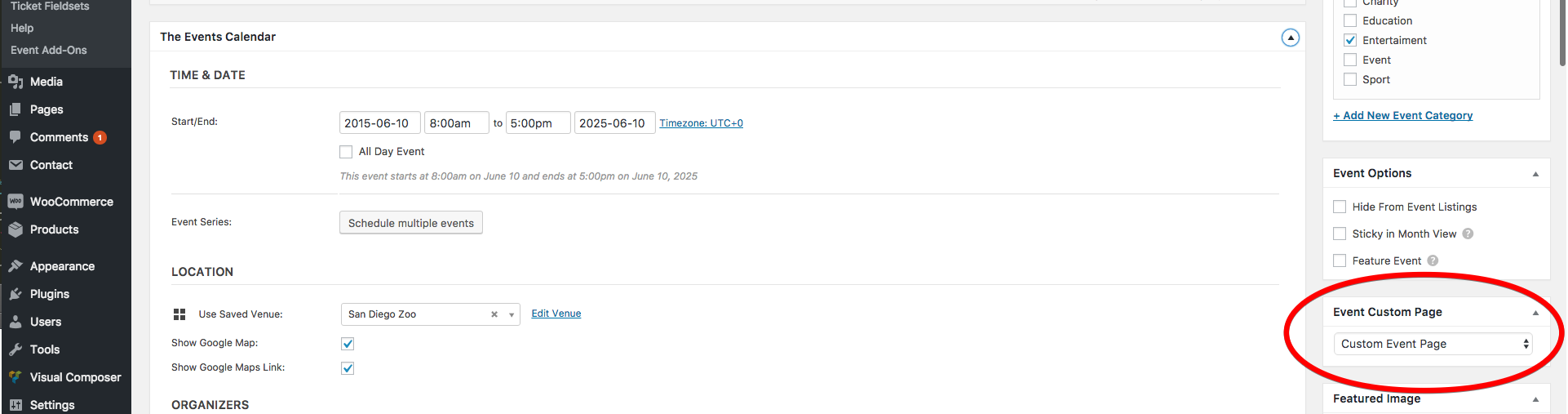
– step 2: Go to edit your single event then select the custom template page for the event page, see the screenshot: https://0.s3.envato.com/files/226539204/preview/03.png
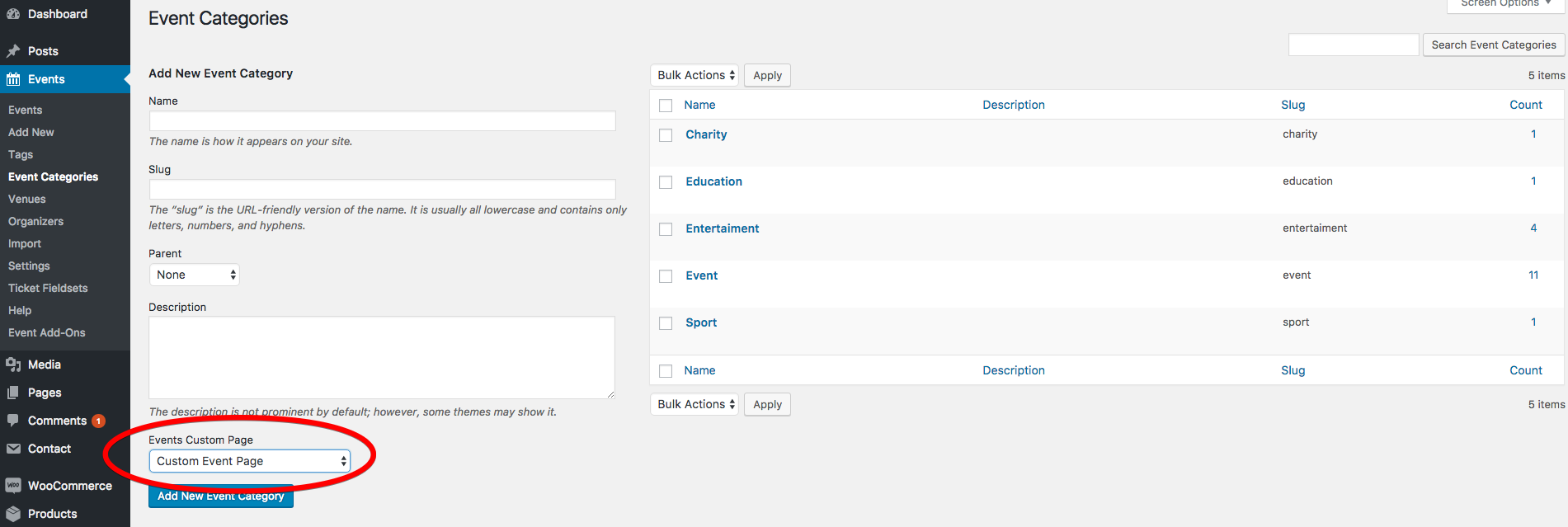
– step 3: View this event. You will see the result. To apply the custom template page for the event category (all of the events in a special category), go Events / Category / Add|Edit category and select the custom template page. see the screenshot: https://0.s3.envato.com/files/226539204/preview/05.png– step 4: To edit or add a new custom template page, go to Pages / Add New Page for edit Custom Event Page template.
Done!
Attachments:
You must be logged in to view attached files.in reply to: Price overlapping with titleHi,
– The Visual Composer plugin is included in our theme. So you do not need to buy this plugin.
– Yes, just buy our plugin. Our plugin The Events Calendar Single Event Page Builder requires the Visual Composer installed to works.
https://codecanyon.net/item/the-events-calendar-single-event-page-builder/19967186Best regards!
in reply to: Price overlapping with titleHi . One more issue, it make my image did not load smooth when i install another plugin on my live web.
===============
Their script is causing a JS error, as it isn’t prepared for their default imagery not being present.https://www.dropbox.com/s/dbgnpp0u0neijaw/Screenshot%202017-02-28%2022.18.20.png?dl=0
I’m afraid that doesn’t fully understand your issue. Please explain with more details, some screenshots, the url your site so we can check.
in reply to: Plugin did not workThis reply has been marked as private.in reply to: Break style of admin/ plugin installedHi,
Please clear browser’s cache or just press Ctrl + Shift + R. I see the change updated and everything fine now.
Have a great day!
in reply to: Layout look corruptedSorry, this is a background default. You use the custom CSS below to remove it. Copy/paste into Theme Options > General > Custom CSS:
body.tribe_community_edit #dawnthemes-page{
background: none;
}
You can set background: none; or background: #hex color;
Thanks for understanding,
Best regards!in reply to: Page Templates